

PricingHow it worksFeaturesFAQKnowledge baseGratis toolsContact
Create invoice

Create invoices
without the hassle

Create invoices and quotes, get paid faster and keep track of your finances — all in one place. Save time and hassle with Stipfactuur: the invoicing tool for freelancers.

Stipfactuur invoice example with payment received notification

Ready in minutes

Create a professional invoice and download it directly as PDF. No account needed.

Get paid faster

Add iDEAL payment links and instantly see which invoices are still open.

More overview

Keep invoices, quotes, clients and costs neatly in one place.

Entrepreneur creating invoices with Stipfactuur

For freelancers and small businesses

Just invoice.
No Excel. No accounting software.

Create professional invoices, send them directly to your client and get paid faster. No spreadsheets. No templates. No features you'll never use.

  • Invoices and quotes
  • Payment links via iDEAL
  • Always an overview
Discover how easy invoicing can be

Everything at your fingertips

From quote
to payment.
All in one place.

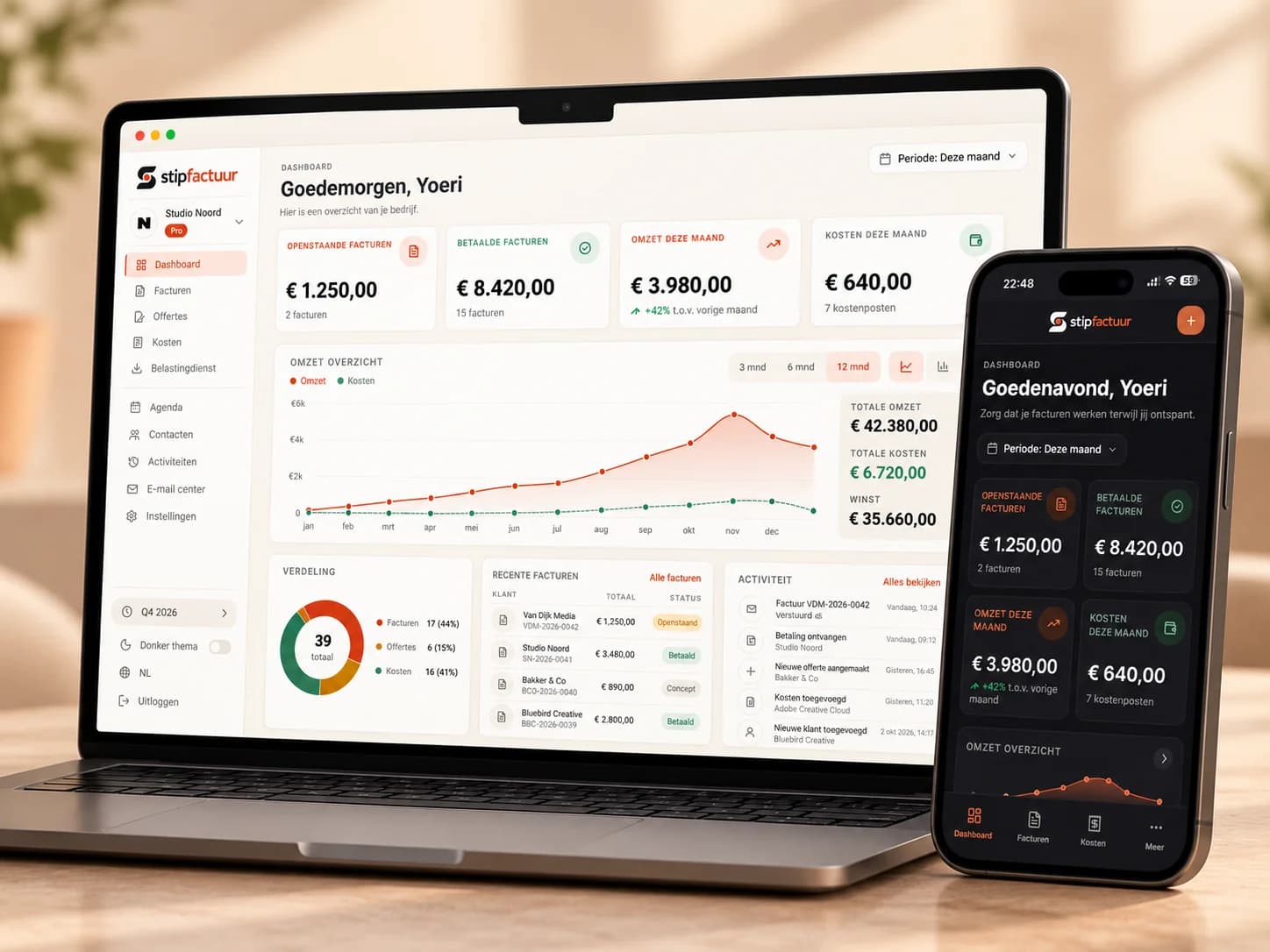
Create quotes, send invoices, receive payments and keep an overview. All from a single dashboard.

  • Quotes and invoices
  • iDEAL payment links via Mollie
  • Clients saved automatically
  • Export VAT overview
  • Emails directly to clients
View all features
Stipfactuur dashboard showing quotes and invoices overview

Who it's for

Built for entrepreneurs. Not for accountants.

Stipfactuur is built for entrepreneurs who want to invoice professionally without complex accounting software.

Why Stipfactuur

Everything you need.
Nothing you don't.

Most entrepreneurs don't need a full accounting platform. They just want to create professional invoices, send them to clients and get paid. That's why we built Stipfactuur.

Paper plane

Simple

No Excel sheets, no Word templates, no complicated accounting software. Just a calm way to create, send and manage invoices without the hassle.

Professional

Professional

Create professional quotes and invoices in your own style so you look polished and trustworthy from day one.

Faster payment

Faster payment

Add iDEAL payment links via Mollie and make it easy for clients to pay right away. See instantly which invoices are paid, sent or still outstanding.

Pricing

Start free. Upgrade whenever you want.

Three clear plans. Switch or stop whenever it suits you.

Free

For the occasional invoice

0

Always free

Register for free

No payment details needed

Included

  • Create invoices and quotes
  • Save up to 5 invoices and 10 contacts
  • VAT and income tax export
  • Send 3 emails per day

Pro

Most popular

For freelancers who invoice every month

4,95

per month · incl. 21% VAT

Choose Pro

Cancel any month

Included

  • Save unlimited invoices and contacts
  • No platform fees on online payments
  • Agenda: track time and create invoices
  • 50 receipts per month read with AI
  • Send 40 emails per day

Unlimited

For teams that want everything automated

9,95

per month · incl. 21% VAT

Choose Unlimited

Cancel any month

Included

  • Everything in Pro
  • Unlimited receipt and purchase invoice reading with AI
  • Unlimited emails
  • Cancel any month
  • Prices incl. 21% VAT
  • Secure payments via Mollie
Compare all features →

Frequently asked questions

Everything you need to know.

Is Stipfactuur really free?

Yes. You can create invoices and download them as PDF without an account and at no cost. No watermark, no hidden limits.

Do I need to create an account?

No. Everything works directly in your browser without an account. An account is optional and lets you save invoices and store contacts.

What do I get with a free account?

You can save up to 5 invoices and 10 contacts, view your dashboard and create exports for your records.

When do I need Pro?

Pro is useful once you invoice regularly and don't want limits on saved invoices and contacts. You pay a low fixed price per month, or yearly with 20% off.

Can I email invoices from Stipfactuur?

Yes, with an account you can email saved invoices as PDF to your client. Your own profile email address is used as the reply-to address.

Does the invoice comply with Dutch regulations?

Yes. The invoice includes all required fields such as VAT number, Chamber of Commerce number, invoice number and VAT breakdown. You fill in the correct details yourself.

Can I add my own logo?

Yes. Upload your logo and it appears automatically on your invoice. The file stays in your browser and is not sent to our servers.

What if I want to cancel my account?

You can delete your account at any time via your settings. A monthly subscription cancels immediately; a yearly subscription simply runs out its already-paid period.

Can my clients see that I use Stipfactuur?

No. The invoice only contains your details and your client's. There is no Stipfactuur branding on the PDF.

Less administration starts here.

Create your invoices for free and see how simple your administration can be.

Create account